The UX Eye Meetup was a Success!

The UX Eye – Mid Peninsula Edition meetup was an overwhelming success!

Abel Allison from Meebo started the meeting showing us how he is using Justinmind Prototyper in his daily work.

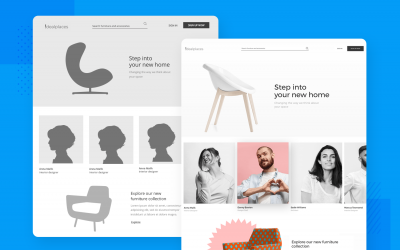
Then Luca issued a challenge to the attendees (an impressive group of cool UX folks): improve Justinmind Website and Usernote with fresh ideas. They created some prototypes and they share them using Usernote. The result: and invaluable feedback that we will certainly take into account for future updates. Some of the suggestions were about the ‘buy button’ in the home and how explain Usernote’s purpose and functionality more clearly

You can take a look at some of the wireframes we made in the meetup here: http://bit.ly/UXEyeWireframes or clicking in the image below.

Thanks to Abel, Marketo, UX Eye organizers and all attendees! And stay tuned for future meetups!

UX Eye for the developer guy

Bay Area Users Experience Professionals aims to be the point of contact between User Experience Professionals (product managers, designers, researchers, front end developers, technical writers, customer support professionals) and the developer community in the San Francisco Bay Area.

Although the main focus will be web application and the related user experience problems and solutions, we’re open to all kind of topics related to User Experience and Information Architecture (and the management of the UX-IA process).

UX Eye Meet-Up is organized by LucaBenJuls and Richard.


Posted in Contest, News, Usability, Wireframe, wireframes | Leave a comment

New Update for Prototyper now available

There has been three weeks or so since we launched Justinmind Prototyper 4.3 and the first bugs appeared. Don’t worry at all! We are aware of that and we have been preparing an update to fix them. This new version (4.3.1) don’t add any functionality but just fix things that didn’t work completely and a few crashes. Some of the things that this update fixes are:

  • Sub menus had errors when exported to HTML
  • Insert into container without drag and drop now places the object in the 0,0 position within the container
  • The 4.3 version crashed sometimes.

We hope that update really help you all. We will keep working and we are preparing some surprises for next September. Stay tuned!

Posted in News, Prototyper, Releases, tool | Leave a comment

UX Eye – Mid Peninsula Edition

Join us at UX Eye – Mid Peninsula Edition, Wednesday, July 27, 2011, 6:30 PM,
in Marketo (901 Mariners Island Blvd. San Mateo, CA 94404, CA) map.

Abel Allison from Meebo will be demonstrating how he uses Justinmind Prototyper in his day to day, while Xavier Renom, Justinmind CEO will answer questions and give away FREE licenses to all participants of this seminar.

After the training, we will engage in a small design competition to explore the possibilities of Justinmind on a real world mini-project.

UX Eye for the developer guy

Bay Area Users Experience Professionals aims to be the point of contact between User Experience Professionals (product managers, designers, researchers, front end developers, technical writers, customer support professionals) and the developer community in the San Francisco Bay Area.

Although the main focus will be web application and the related user experience problems and solutions, we’re open to all kind of topics related to User Experience and Information Architecture (and the management of the UX-IA process).

UX Eye Meet-Up is organized by Luca, Ben, Juls and Richard.

Posted in Giveaway, Prototyper, tool, Tutorial, Usability, Wireframe | Leave a comment

Justinmind 4.3 is here!

Hi Justinminders! Today we are proud to announce the 4.3 version of Justinmind Prototyper. These are the new features and bug fixes included in this version:

Drag and Drop simulation

A complete set of events and actions is now available to build the coolest drag and drop effects ever seen. New events: ‘on Drag Started’, ‘on Drag’ and ‘on Drop’; and new actions: ‘Move’ and ‘Insert Into’. We can only image what you can simulate with this events but let’s have a look at some examples in this video:

Effects and Animations

There is plenty of features requests we could implement but we thought, hey, let’s be cool! So we add effects for the hide/show action: fade in/out and slide (in the four directions). This is specially useful for iPhone and Android prototypes.

Performance in Mac version

Ok ok, we admit Prototyper is slooooow in Mac and sometimes hangs… but no more! We detected where the memory leak was and we fix it. Now you can work with Prototyper all the day long!

Simulate back navigation

A new option has been added to the Link to action: ‘Link to previous screen’. So now you can simulate the famous ‘back’ link in your prototypes.

Many other features

  • Export your prototype’s screen as image files (check the new Share-> Save as images.. option in the main menu)
  • ‘On page load -link to’ we removed the silly restriction to links in the on page load event.
  • Order attributes and records in data master. You can reorder the attributes so when you drag and drop a data master into a screen the fields appear in that order. You can do the same with the Data Master records.
  • Widgets view improved. Now the title is placed below the icon of each widget and when you create your own widgets you can choose between an icon file or to take a snapshot of the widget and use it as the icon. Also when you import or create a library the new widgets appear at the top of the list.
  • We improved the appalling Grid view and now is so neat. Give it a try by selecting the View – Grid option in the main menu.
  • Sliders in panels. Now the separation between the panels in the workspace is more clear and you can define the size for each.
  • Zoom turns back to 100% when you click the simulate button.
  • Drag and drop image files directly to Prototyper and open a .vp file by double-click in Mac.

Check our drag and drop and effects tutorials to learn how to have them in your next prototype.

We are quite excited with this new update! But we can’t stop in our duty to build the best prototyping tool ever and we start to think about the next release. We are preparing some surprises but we advance some new features coming in the next release. We will add new widgets such as tabs, accordion and link and many other cool things. Stay tunned by subscribing to our newsletter or subscribing to our twitter or facebook accounts (box on the right of this screen).

Posted in News, Prototyper, Releases, tool | Tagged , , , , , , | Leave a comment

Coming soon: Justinmind Prototyper 4.3

Hi beloved Justinmind users and followers. Today we want to make your mouth water with the new features coming with Justinmind Prototyper 4.3 (June 27th).

Drag and Drop simulation

A complete set of events and actions is now available to build the coolest drag and drop effects ever seen. New events: ‘on Drag Started’, ‘on Drag’ and ‘on Drop’; and new actions: ‘Move’ and ‘Insert Into’. We can only image what you can simulate with this events but let’s have a look at some examples in this video:

Effects and Animations

There is plenty of features requests we could implement but we thought, hey, let’s be cool! So we add effects for the hide/show action: fade in/out and slide (in the four directions). This is specially useful for iPhone and Android prototypes.

Performance in Mac version

Ok ok, we admit Prototyper is slooooow in Mac and sometimes hangs… but no more! We detected where the memory leak was and we fix it. Now you can work with Prototyper all the day long!

Simulate back navigation

A new option has been added to the Link to action: ‘Link to previous screen’. So now you can simulate the famous ‘back’ link in your prototypes.

Many other features

Export your prototype’s screens as image files, ‘on page load – link to’, order attributes and values in Data Masters, widgets now have names and icon, create icons for your own widgets automatically, a new grid, download libraries from extras and some bugs fixed like open a .vp file with double-click in Mac and drag image files in Mac.

Justinmind Prototyper 4.3 is on its way…

Posted in Prototyper, Releases | 2 Comments

Android 2.3 Gingerbread Library Available Now!

Hi folks!

Android 2.3 Widget Library

We updated the Android widget library to prototype mobile applications with Justinmind Prototyper and we added widgets from the 2.2 version and a completely new set of widgets to prototype the new Android 2.3 Gingerbread interface.

They are cool! Download them at Extras and give them a try! (Remember you need to have Justinmind Prototyper installed to use them). Select File -> Import -> Widget Library in your Prototyper and select the downloaded library, then you will have your Prototyper ready to create astonishing high interactive prototypes for Android.


Posted in Libraries, Mobile | Leave a comment

Ultimate Windows 7 Phone Library

This is the ultimate stencil for folks designing Apps for the new Windows 7 Phone. With this widget library and Justinmind Prototyper you will prototype your next Windows 7 Phone app faster than ever.

• Contains backgrounds, title bars, buttons, selectors, and other Windows 7 Phone UI elements

• Text is fully editable on lists, title bars and buttons

• Taken from actual screenshots. No fake art!

Take a look at all the widgets included and tell us your thoughts. And don’t forget to download it and try!

Posted in Libraries, Mobile | Leave a comment

Help us Spread the Word!

We’re looking for Evangelists to help us spread the word about Justinmind and ‘Start with a Prototype’ approach. Here are just some ways to get involved:

Write a blog post. Share your experience with the community. Write an article or a review about how you are using Justinmind Prototyper, this will help us a lot to promote product attributes and benefits. We will give away a perpetual license for every quality and honest review. Have an idea for a blog post? Email us to discuss and find out more.
Let us sponsor your event!. We can provide some free licenses of Prototyper to your conference attendees. You can also give a talk or host a Justinmind demo. A local meetup can not only spark a conversation about Justinmind but generate more interest in ‘Start with a Prototype’ philosophy.
Share your Widget Library. Have you created a Widget Library? Share what you’ve built! Send us your Prototypes and Widget Libraries and we’ll publish them on our Extras page.
Place a badge on your site and link to our website. One great way to help out is by linking to Justinmind web site. If you have a web site and want to link to us, please do so. If you want the webmaster of your favorite site to link to us, we’d appreciate that too! To make it easy and graphically appealing for you to link to us, we’ve posted sample badges and html coding on this page. Feel free to cut-and-paste any onto your web pages.

If you like what we do, what we are about or our products please help us spread the word!, you can contact us at stw@justinmind.com. However you decide to spread the word, we’d like to thank you!.

Posted in Uncategorized | Leave a comment

Put a Justinmind badge in your blog

Want to help spread the word? Below you will find some badges. Copy the code for the badge you want to share and paste it into your site’s HTML code.

Create web and mobile application wireframes

Create web and mobile application wireframes

Create web and mobile application wireframes

Create web and mobile application wireframes

Create web and mobile application wireframes

Contact us if you need other badge size or other color/style that fits better in your website.

Posted in Uncategorized | Leave a comment

Justinmind Winner of the Prestigious Red Herring Top 100 Europe Tech Award!

Amsterdam – May 26th, 2011 – Justinmind Prototyper, the ultimate software prototyping tool for mobile and web applications, was awarded the Red Herring Top 100 Award for being a leading private company from Europe and excelling in the tech startup realm. Red Herring’s Top 100 Europe list has become a mark of distinction for identifying promising new companies and entrepreneurs. Past Red Herring winners include Facebook, Twitter, Google, Yahoo, Skype, Salesforce.com, YouTube and Ebay.

“This year was very rewarding. The global economic situation has abated and there are many great companies producing really innovative and amazing products. We had a very difficult time narrowing the pool and selecting the winners. Justinmind shows great promise therefore deserves to be among the winners. We know that the 2011 crop will grow into some amazing companies that are sure to make an impact.” – Alex Vieux, publisher and CEO of Red Herring

Red Herring’s editorial staff evaluated the companies on both quantitative and qualitative criteria, such as financial performance, technology innovation, management quality, strategy, and market penetration. This assessment of potential is complemented by a review of the track record and standing of startups relative to their sector peers, allowing Red Herring to see past the “buzz” and make the list a valuable instrument of discovery and advocacy for the most promising new business models in Europe.

Xavier Renom, CEO of Justinmind commented “We are really proud to win this Award from Red Herring. Coupled with our recent award in the Eclipse Conference and the new office in Sylicon Valley we strongly believe 2011 will be a year to remember.”

With Justinmind application prototyping solutions, there is no need to develop your applications or websites to test concepts, validate features, or prepare usability tests: you can do all this right from the interface without a single line of code.

By being a Red Herring Europe Winner, Justinmind becomes eligible to be entered into the Red Herring Global Competition where the best of the best from Europe, Asia and North America will fight it out for the Red Herring Global Award.

Posted in Award, News | Leave a comment